Questions
Reports
Analysis
Introducing Gabor-Granger Pricing Tests
The price that earns the most, and why buyers pay it
You can now run a Gabor-Granger pricing test in any Listen Labs study.
Ask buyers how likely they are to buy your product at a particular price. Based on their answer, Listen walks them up or down your custom pricing ladder to find the price they’re willing to pay.
Across all the participants in your study, you get demand and revenue curves. And you can hear from buyers in their own words why they landed on a particular price.
When your buyers explain their decisions in natural conversations, you can understand the mental models behind their choices. Those insights can inform how you go to market and what to build next.
With Listen, a pricing test can become your pricing strategy.
Interviews
Participants
Introducing the New AI Interviewer
Clear screens, simple controls and interviews that just work
The new AI Interviewer is now live.
The updated design is easy to use and keeps your participants engaged. A speech visualizer moves as participants talk, so they know they're being heard. All the controls sit in one place.
It's built to be reliable, with a new backend you can count on. It incorporates the latest research best practices and runs on the most up-to-date AI models.
There's nothing to turn on. It's live for every study on web, new and old. Open the preview in your study editor to try it.
Media
Video
Testing
Security
Watermark Your Study Images and Videos
Put your mark on concepts you share
You can now watermark any image or video you upload to a study.
In the study editor, click the image or video and switch on the watermark. You can turn it off anytime.
Studies often show work that isn't public yet, like new concepts, ads, and designs. A watermark discourages participants from screenshotting or sharing. Test with confidence.
Study Creation
Feature
Build Studies Faster
The discussion guide has a new look
Study design has never been easier. Each question card now shows its controls up front, including conditional logic.
Set the question type and choose how many follow-ups you want, then add your conditions. Write follow-up instructions in the same place.
Long guides are easier to scan. You can see what each question does at a glance, so studies come together faster.
Product
Study Creation
Reports
Introducing Pulse, a Conversational Tracker
See KPI shifts before the numbers move
You can now run longitudinal studies in Listen Labs. Unlike conventional longitudinal studies, Pulse asks open-ended questions next to your quant questions.
Listen then codes participants’ answers into themes you can trend. New themes show up before your KPIs move so you can act while it still matters.
Track any metric, like brand health, NPS, or how you stack up against competitors.
Open the study builder, go to Advanced Study Settings, toggle the feature on and pick your interval. You can even add topical questions to any wave, so you don't need a separate study.
Agent
Prototyping
API Keys Are Now Self Serve
Make your own key and start building
You can now make your own API key.
If you have admin access, open Listen Labs and navigate to your Account page. Create your key in the Developer section. Use it to connect Listen to your own tools.
Feature
Reports
Analysis
Edit Charts in Reports
Change chart metrics in one click
You now have more control over the charts in your reports.
Decide how to represent metrics and filter by segments. For standard questions, toggle between representing percent or count. For complex questions like MaxDiff, you have even more options like choosing index score or probability of choice.
Open a report, hover over a chart, and click Chart Options in the top right corner.
Now your chart shows the comparison you care about. That makes it easier to tell the story behind your data.
Presentations
Feature
Ready to Share Decks in One Click
Create on-brand study result slides instantly
Turn a study into a finished deck in your own template. Colors, chapter slides, callouts, and layout all match your brand.
Just add a deck your team has used to share findings in the past, or your company’s branded template.
Set it up two ways. Drop your template into chat and ask for a deck built from your study. Or add a workspace template once, and every auto-generated presentation will be in that style. Set up your organization’s default template in your workspace settings.
Before, matching your brand meant reformatting each deck by hand. Now it comes out on-brand, polished, and ready to send as-is.
Reports
Workspace
Editing
Report Editing and Editions
Build, edit, and save multiple reports from a single study, shared with your whole team
You can now build more than one report from the same study data. Point one at a European segment, another at a different framework, and keep them side by side for your whole team.
Start a new edition from a blank report, or give the AI a prompt and let it build a full report around what you asked for.
Edit any report two ways. Tell the AI chat "shorten the exec summary," then see, hide, or undo each change. Or edit by hand like in Notion, drag blocks, type, or drop in stimuli. Version history saves every step, and your original auto-generated report stays untouched.
MCP
Study Advisor
Research is Now a Claude Skill
Plan, launch, and analyze studies from Claude
We made a Listen Labs research skill for Claude. It teaches Claude the full research workflow: how to turn your goal into a study, write the guide, set up recruiting, and pull the findings together.
Here is how it works. Add the skill, connect Listen Labs in Claude, and tell Claude what you want to learn. The skill guides the research. The connector lets Claude build and prepare the study.
You stay in control. Before anything goes live, you review what participants will see and approve the launch, including the cost. When responses come in, Claude helps you analyze and understand your findings.
Segments
Study Creation
Questions
Segment the "Picked a Few" Crowd
Segment by how many options someone chose
Create more precise segments from multi-select questions.
With the new ‘has selected at least’ rule, you can group participants who chose a minimum number of options from a list.
For example, people who selected at least 3 of 6 brands, features, or traits. It works with multi-select multiple-choice questions, including screener and main study questions in analysis segments.
In the segment editor, choose the question and set the minimum a participant had to pick. Now one clean segment condition.
MCP
Research Agent
Interviews
Create Studies via API
Launch studies programmatically, from your own tools
You can now create and launch studies through the Listen Labs public API. Set them up in code instead of clicking through the app. Call the create-study endpoint to build a draft from an existing discussion guide, then call the launch-study endpoint to publish it and get your participant link.
Automate study creation in your own tools and workflows or launch many studies programmatically.
Today the API covers self-recruitment studies, where you bring your own participants.
Interviews
Participants
Questions
Media
Analysis
Participant File Uploads and Analysis
Collect files during the interview and probe what's inside
You can now ask participants to upload files during interviews.
Listen Labs' AI moderator reads the file and asks relevant follow-ups.
Use it to ask a shopper to share a photo of a product you want to learn more about, or confirm that someone uses your product with a screenshot of their account page.
The response quality score takes the participant's upload into consideration. So the file is part of the interview, not a side channel.
Analysis
Reports
Visual Insights
Visual Insights Reporting
Your report shows what people did, not just what they said
When a screen-share study wraps, Listen turns everything that happened on screen into findings you can read, query, and count.
Open the study report to see say-do gaps and on-screen patterns across every session. Ask Chat for per-task time, medians, 90th percentiles, or click counts. Spin up a highlight reel of the friction points on demand.
Behavior used to be stuck in hours of recordings. Now you skip the scrubbing and the hand-built clip reels. Every finding traces back to the exact moment on screen, so you can stand behind it.
Interviews
Localization
Study Creation
120+ Interview & Reporting Languages
Interview participants in their own language and analyze in yours
Listen now runs interviews in 120+ languages and variants, including languages with smaller speaker populations like Welsh, Māori, and Wolof.
Choose the interview languages when you set up the study. Text-based questions translate automatically, and the AI moderator converses naturally, asking follow-up questions for additional depth.
People give deeper, truer answers in their own language. So you can hear from whoever you need, and reach markets you couldn't easily access before. Plus, you can run analysis in whatever language is best for you.
Analysis
Reports
MaxDiff
MaxDiff Decision Analytics
Beyond the ranking: what do you actually choose?
MaxDiff ranks a long list of options. Decision analytics on top of any MaxDiff answers the next question: given these results, what do you choose?
Portfolio optimization (TURF) finds the combination of options that reaches the most people, not just the top scorers. The best three to ship together often aren't the top three alone, because some appeal to the same people.
Head-to-head puts any two options side by side and shows how the audience would split. A clear "who wins" story for stakeholders.
Open a study's details page, scroll to your MaxDiff question, and see head-to-head results for every combination or select your parameters to optimize your portfolio.
You can also download the raw responses and modeled utility per respondent as a CSV. Or just ask chat.
Study Creation
Editing
Collaboration
Introducing Version History
See and go back to earlier versions of your study
When you build a study, every change is now saved. Click the clock icon in the top right to see the full history.
From there you can preview any past version and restore it.
Now if someone on your team makes a bad edit, it’s simple to roll it back. You stay in control.
Reports
Media
Presentations
The Right Media With The Right Feedback
Know exactly which image drove each piece of feedback
Reports and decks now show the actual concept images, not just the labels.
Each image sits right beside its feedback. You can tell at a glance which concept each comment is about, with no guessing and no matching labels by hand.
While building your report, you can reference media in the editor. If you create a presentation in Listen Labs, the same images or videos show up there automatically.
Now the results of your concept tests are even easier to present and share.
Video
Agent
Research Agent
Recording
Visual Insights
Introducing Visual Insights
Listen can now see and react to users' live on-screen behavior
You can now have the Listen Interviewer watch a participant's screen during a usability study. It will ask follow-up questions based on what users actually do and probe if their behavior differs from what they say.
Old AI testing can only gather data from what people say. But people don't always do what they say. Visual Insights catches the gap. It asks why someone skipped the reviews they said they cared about. It pulls people back if they drift off task.
You get richer answers, fewer wasted sessions, and less cleanup later. Available today for desktop studies.
Analysis
Reports
Segments
Introducing MaxDiff
A clear preference ranking from a long list, natively in Listen
You can now run MaxDiff inside Listen. The prioritization studies you used to break out into a separate tool now live with your other research.
Respondents see a few items at a time and pick the most and least important. Across several screens, our statistical model produces a preference ranking.
Add it in the editor or ask the chat. Set one word like "important," and Listen writes the "Most important" / "Least important" labels and builds the screens for you.
You get a ranked chart scored against the average. Click in for best/worst counts and per-respondent breakdowns.
No more exporting and stitching results back together. We checked our model against Sawtooth's and got an identical ranking, with scores correlating ~0.996.
Agent
Study Creation
MCP
Create Listen Studies in AI Tools, like ChatGPT
Build, edit, and launch studies with the Listen MCP
You can create, edit, and launch full studies straight from ChatGPT, Claude, or any AI tool that connects via an MCP. When your study ends, access and act on your findings, too.
You can find Listen Labs in the ChatGPT app directory under Apps, with no additional setup needed. You can also add Listen Labs as a connector in Claude, Codex, or any other AI tool at listenlabs.ai/mcp.
Describe your research goal, and Listen builds the discussion guide, recruits your audience, and takes the study live, in the AI tool you already use. One flow, from idea to live study.
Localization
Study Creation
Media
Run Global Studies with Localized Media
Show every market the right media, in a single study
You can now upload different media for each language in a study.
Before, every market saw the same asset, or you split one study into many. Now your localized concept and creative tests are right, and your analysis stays in one place.
Add an image, video, or concept for each language. A German participant sees the German version. A French participant sees the French one. The study stays one study, analyzed in one language.
Set it up in Study Composer. Add variants in the UI, or just ask in chat.
Agent
Research Agent
Analysis
Video
Import
Introducing Video Imports
Upload your interviews into Listen for full AI analysis

You can now upload video recordings of past interviews and use the same AI analysis tools you use for studies run natively on Listen.
In the Research Library, click import and upload up to 50 videos at once. Listen makes one study from the batch. Each video becomes its own response.
You get a responses table, report, chat, themes, transcriptions, and clips. The study is also searchable in the Research Library, right alongside your other research.
Study Creation
Quality
Questions
Study Advisor
Catch Study Issues Before You Launch
Spot and fix study issues right beside each question
Good research is hard. Even as a trained researcher, you might forget to attach the stimuli, misconfigure a conditional, or assume prior knowledge. We built Study Advisor to bring research best practices to everyone.
The Study Advisor now shows its warnings and recommendations inline, next to the question each one is about.
As you write and edit in the editor, issues appear right where they belong. Each note sits beside the question it affects, whether that’s a leading question, a missing confirmation, or a step that breaks best practice. Apply the fix in place.
Before, every issue lived in one separate list, away from your questions. You had to guess which question each one meant, and easy fixes slipped through. Now the guidance meets you where you work, so you catch problems before you launch.
Study Creation
Questions
Introducing Matrix Questions
Get cleaner comparative data

You can now ask respondents to rate many options on one shared scale, all in a single grid.
Asking people to rate fifteen things one by one loses them by question four. A matrix puts every option side by side, so you get lower drop-off and sharper comparisons. And the AI moderator still probes on the why behind specific ratings, so you go beyond a plain survey.
Add it in two ways. Ask the Study Composer for a matrix question in plain English, or pick the type yourself and edit the rows and scale directly. Choose single or multi-select. When responses come in, a grid view shows the comparison at a glance.
Agent
Research Agent
Analysis
Research Library
Introducing Research Library
A compounding knowledge hub for your entire body of research

You can now ask a question across every study you’ve ever run and get answers that trace back to the exact respondent, discussion guide, and study.
Open your Listen workspace and ask a question in plain english. Listen then searches every study in your workspace simultaneously, returning a synthesized answer with every source attached. Click through to the exact verbatim, see who said it, and understand the context it came from.
Interviews
Questions
Screening
Panels
Save your screener as a Saved Audience
Recruit the same audience across studies without the repeat work

You can now save, edit, and reuse your screener questions as a “Saved Audience”.
This means you can recruit from the same audience without starting from scratch each time, and apply the audience across studies
Simply load a saved audience, customize if needed, and launch.
Study Creation
Agent
Editing
Study Composer
A new and unified study creation flow
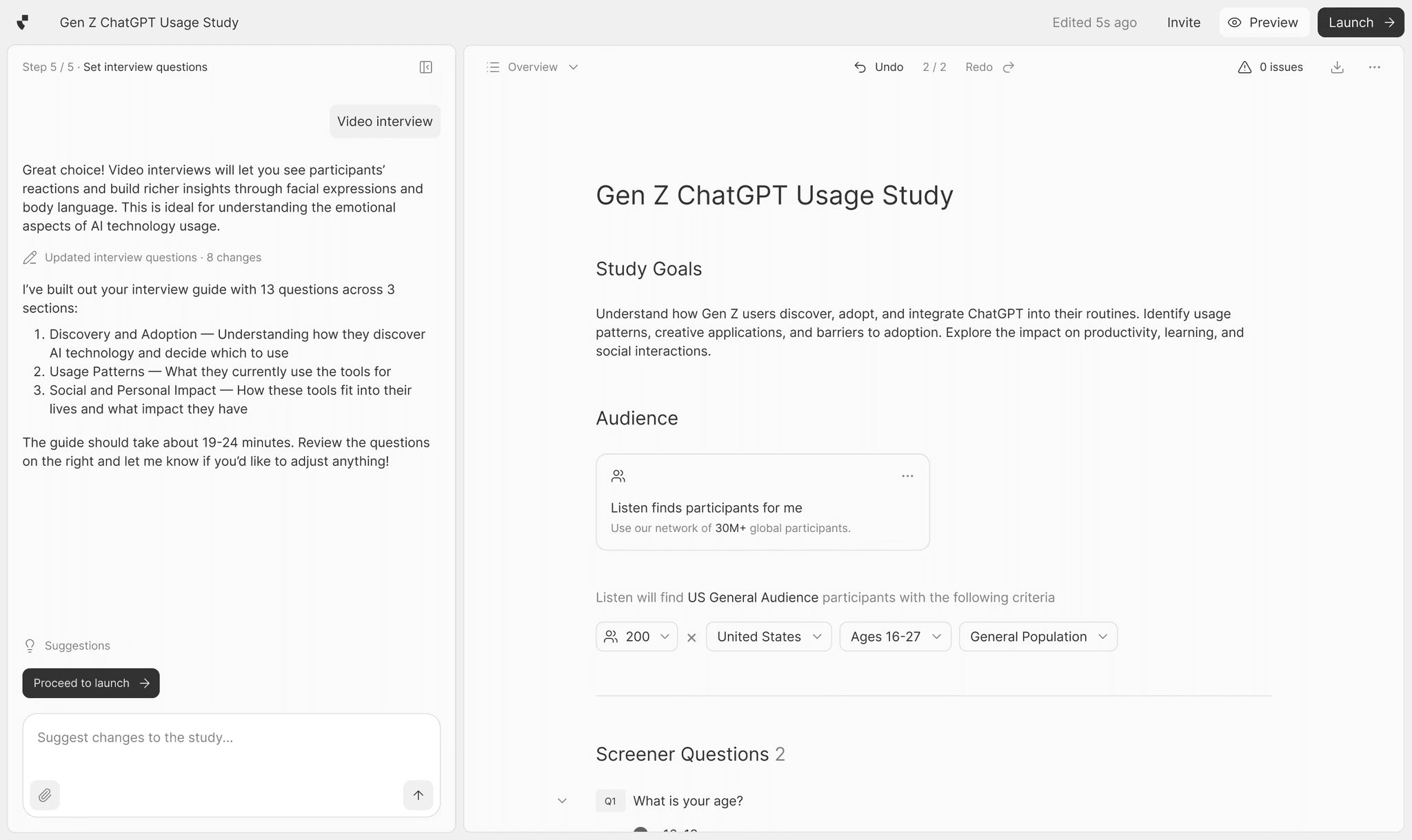
Until now, building a study meant switching between a chat interface and a separate editor to preview and verify your changes.
Study Composer brings both into one place. You can co-design your study with Listen’s AI research assistant in one unified flow.
Talk through your research goals in the chat and watch the updates flow live in front of you.
Prefer to edit directly? The AI adapts.
You can prompt, make manual in-line edits, and preview your study in real time without ever leaving the page.
We built it because study creation should feel like driving, not delegating. You stay in control, and the Study Composer fills in the gaps when you want it to.
Interviews
Analysis
Emotions
Human nuance has always lived between the lines of a transcript.
Now you can capture it in Listen Labs.

Emotional Understanding is Listen's new multi-modal analysis layer that detects emotion across voice, tone, language, and video. See how facial expressions and word choice together can tell a different story than what text alone may suggest.
We built it to industry standards, incorporating Ekman's six universal emotions framework and benchmarked against MELD for state-of-the-art accuracy.
Per-question emotion scoring and pre-built visualizations make it easy to compare how different concepts, creatives, or markets land emotionally. Every signal is traceable to a timestamp, verbatim quote, and AI reasoning, so your insights are grounded and ready to act on.
Research Agent
Agent
Analysis
Introducing Research Agent
The researcher built into every study

Listen Labs made it possible to talk to thousands of users through AI-moderated interviews.
Research Agent handles everything that comes after.
With a single prompt, Research Agent can run the full analysis workflow — segmented analysis, significance testing, verbatim quotes, and stakeholder-ready deliverables including slides, charts, reports, and highlight reels — all inside Listen. You can even run Python scripts or pull data from the web, with every output traceable back to the underlying responses.
For research teams, this means going from raw interviews to a finished deliverable in hours versus days, with no data analyst, video editor, or separate reporting tool required.
Research Agent is available today. Open any study in Listen and start a conversation on the Analysis page.
Interviews
Localization
Voice Interviewer Available in 42 Languages
Bring your research to global audiences with natural-sounding voices

We've added audio playback so participants can hear questions read aloud in their language.
Preview and choose from multiple voice options across 42 languages to create more accessible, engaging interviews that feel authentic no matter where your participants are.
You can enable this in the ‘settings’ bar while editing your Discussion Guide.
Workspace
Admin
New Role: Collaborator
More hands on deck, with the right checks in place

We've launched a new workspace role, Collaborator, that lets team members create and edit studies but not launch them. Only Researchers and Admins can launch studies live.
Admins can review Collaborator work before it goes out, then promote them to Researcher or Admin status when ready.
This makes it easier to bring more people onto the platform with the right approval workflows in place.
Mobile
App
Interviews
Recording
Testing
Prototyping
Mobile Screen Recording Is Live
Our most requested feature last year

What you can do:
Test native iOS apps with full mobile context
Record entire screen activity—app switching, notifications, multitasking
Watch users navigate between your app and competitors mid-journey
Identify friction and drop-off across complete mobile experiences
Build insights from real behavioral evidence, not assumptions
Participants join via our lightweight iOS app by opening the study link on their phone or scanning a QR code.
Mobile Screen Recording is rolling out to select customers in phases. Interested? Let us know.
Study Creation
Analysis
Questions
Introducing Ranking Question Types
Capture trade-offs that rating scales miss
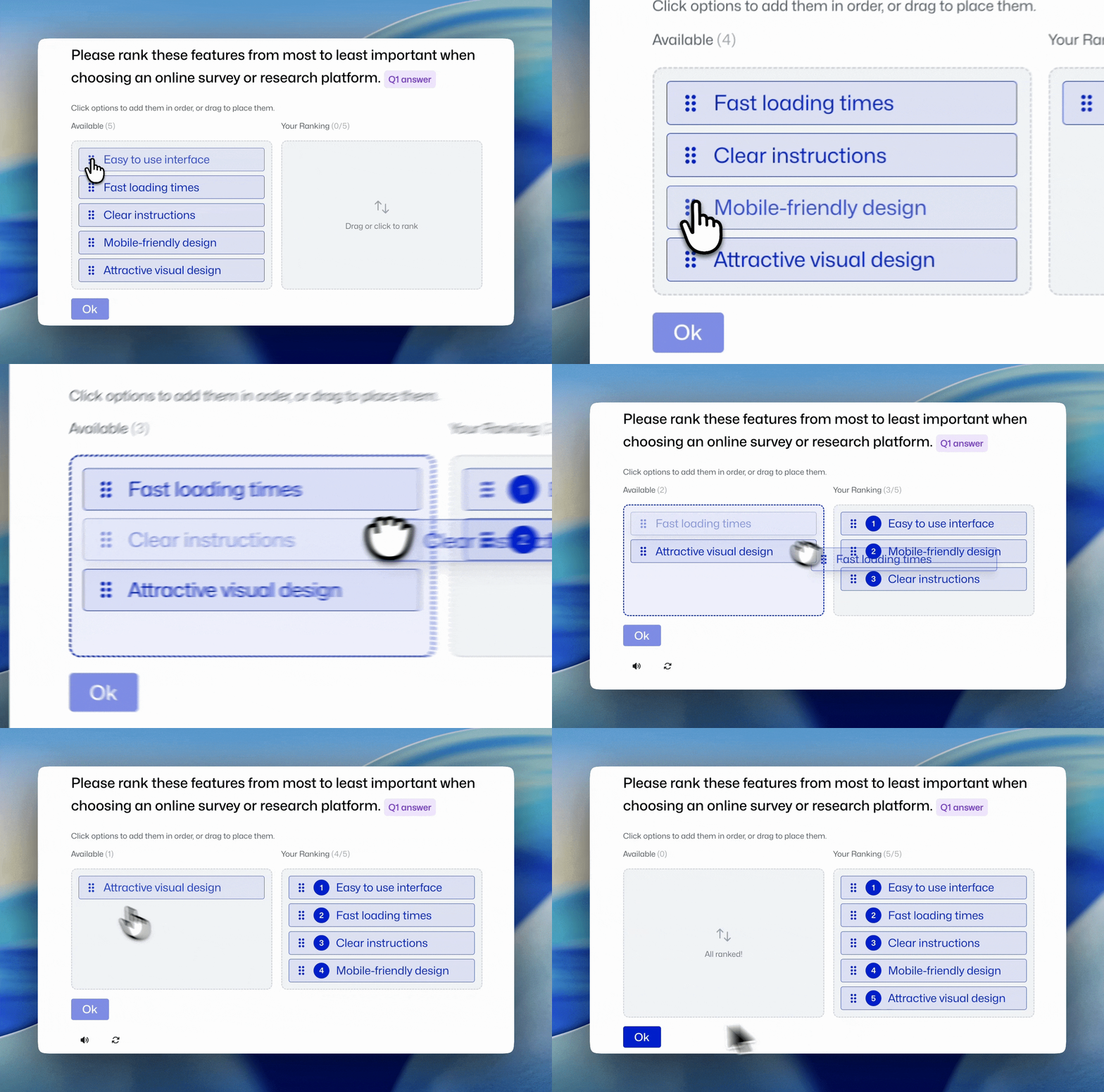
We've added ranking as a question type.
Respondents drag, drop, or tap to order options by preference, forcing the kind of trade-offs that rating scales simply can't capture.
Unlike traditional ratings where everything could score equally high, ranking pushes respondents to actually compare options rather than evaluate them in isolation.
The result is clearer priority structures that show not just what people like, but what they'd choose first when constraints are real.
You get decision-ready data with meaningful differentiation between options—exactly what you need for confident strategic decisions.
Reports
Analysis
Report Memo Page Revamped
Analysis organized around your study objectives
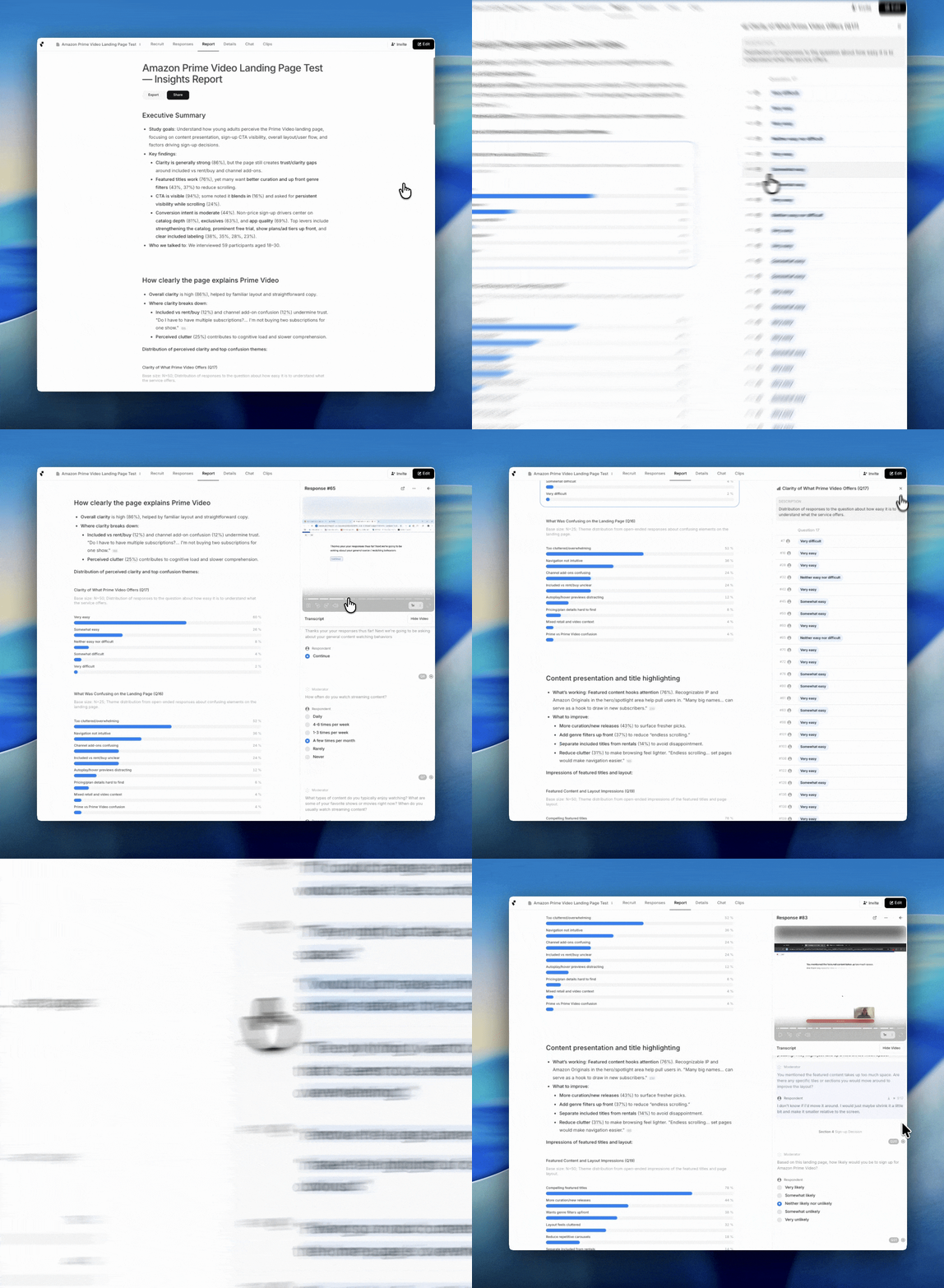
You defined your study goals. We organize your analysis around them.
The new “Report” page generates a custom narrative structured by your objectives. Each goal gets its own section with relevant findings, live charts, and links to participant responses that support them.
Click any data point to inspect responses, copy visuals for stakeholder updates, or download data for deeper analysis. Everything connects back to what you actually needed to learn.
The “Details” page remains your comprehensive view for granular question-level analysis. The Report is your goals-first layer: showing exactly how your research answers the questions you came for.
Incentives
Panels
Participants
Pay Incentives Through Listen
In just one click

When you bring your own participants to a Listen study, you can now reward them with gift cards in a single click—no more juggling spreadsheets, tracking who completed what, or manually processing payments.
This matters because participant management is one of the biggest operational bottlenecks in research. Teams typically spend hours cross-referencing completion data with email lists, then days processing individual payments through separate platforms. That's time you're not spending on analysis.
With integrated incentives, Listen automatically tracks completions and handles distribution. Your participants get thanked immediately, you eliminate administrative overhead, and your research moves faster from fielding to insights.
Workspace
Study Creation
Quality
Workspace-Level Study Guidelines
You're in control

Now you can set guidelines that automatically apply to all new studies created in your workspace—ensuring every project starts with your organization's standards baked in.
Use it to add required screening questions, enforce your brand's tone of voice, or include standard demographic questions across all discussion guides. No more copy-pasting boilerplate or reminding team members about requirements. Your best practices become the default.
This matters because as research scales across teams, consistency becomes harder to maintain. Workspace guidelines eliminate the manual work of ensuring quality and alignment—so your team can focus on insights, not setup.
Find the setting under the "Workspace" tab on your homescreen.
Have more questions? You can read more about setting up guidelines from our Support article here.
Use Case
© 2026 Listen Labs • All rights reserved